Federation Guide - External Registry Integration
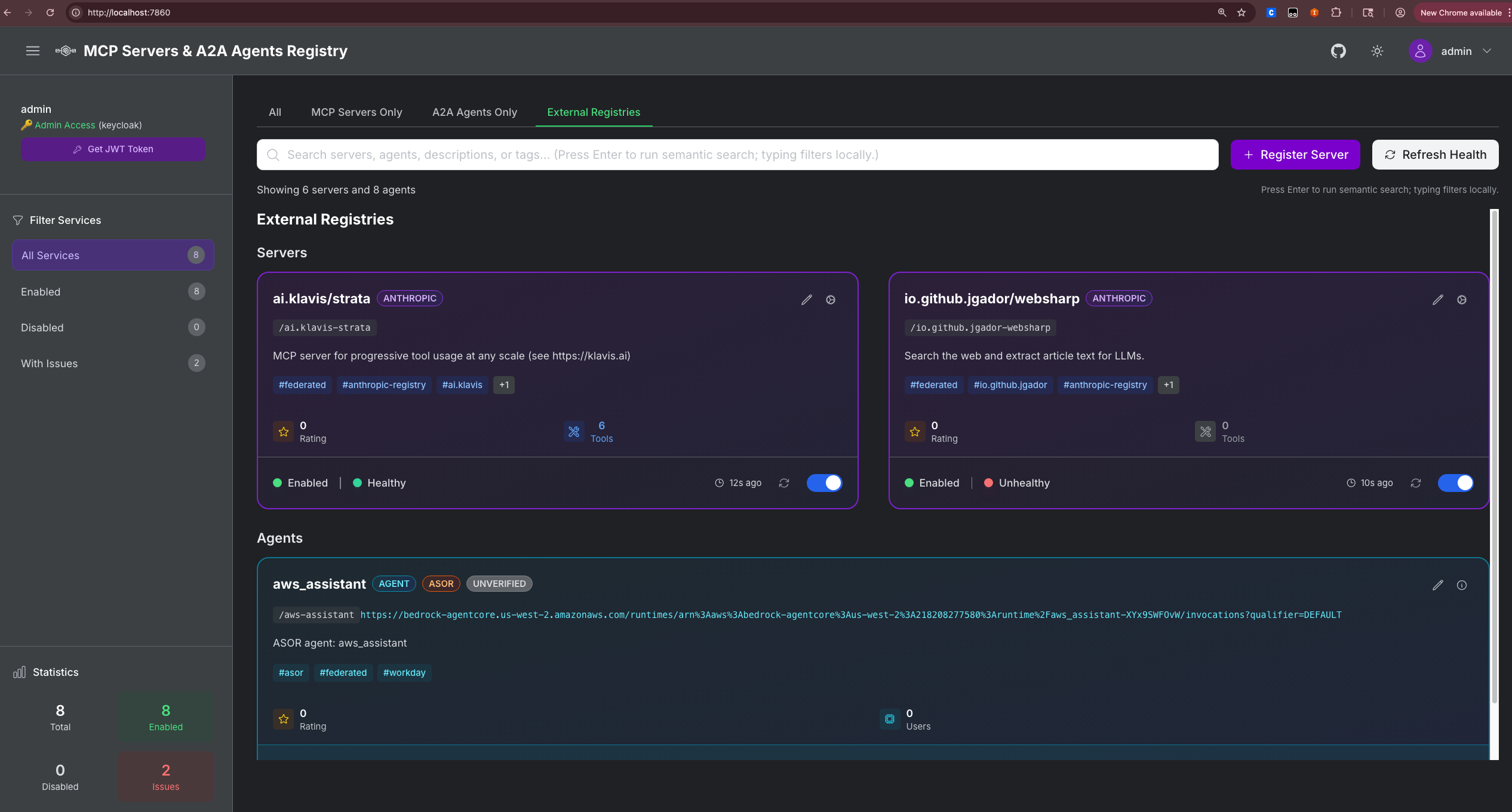
The MCP Gateway Registry supports federation with external registries, allowing you to import and manage servers/agents from multiple sources through a unified interface.
Supported Federation Sources
| Source | Type | Description | Visual Tag |
|---|---|---|---|
| Anthropic MCP Registry | MCP Servers | Official Anthropic curated MCP servers | ANTHROPIC (purple) |
| Workday ASOR | AI Agents | Workday Agent System of Record | ASOR (orange) |
Quick Setup
1. Environment Variables
Add to your .env file:
# Anthropic MCP Registry (no auth required)
ANTHROPIC_REGISTRY_ENABLED=true

# Workday ASOR (requires OAuth credentials and token)
ASOR_CLIENT_ID=your_client_id
ASOR_CLIENT_SECRET=your_client_secret
ASOR_TENANT_NAME=your_tenant_name
ASOR_HOSTNAME=your_host_name
2. Federation Configuration
Create or update ~/mcp-gateway/federation.json:
{
  "anthropic": {
    "enabled": true,
    "endpoint": "https://registry.modelcontextprotocol.io",
    "servers": []
  },
  "asor": {
    "enabled": true,
    "endpoint": "https://wcpdev-services1.wd103.myworkday.com/ccx/api/asor/v1/awsasor_wcpdev1",
    "auth_env_var": "ASOR_ACCESS_TOKEN",
    "agents": []
  }
}
3. Start Services
Anthropic MCP Registry Integration
Configuration
{
  "anthropic": {
    "enabled": true,
    "endpoint": "https://registry.modelcontextprotocol.io",
    "servers": [
      {"name": "io.github.jgador/websharp"},
      {"name": "another-server-name"}
    ]
  }
}
Configuration Options
| Option | Type | Default | Description |
|---|---|---|---|
enabled | boolean | false | Enable Anthropic federation |
endpoint | string | https://registry.modelcontextprotocol.io | Anthropic registry API endpoint |
servers | array | [] | Specific servers to import (empty = all) |
Import Specific Servers for Anthropic
Option 1: Configuration File
{
  "anthropic": {
    "servers": [
      {"name": "io.github.jgador/websharp"},
      {"name": "modelcontextprotocol/filesystem"},
      {"name": "modelcontextprotocol/brave-search"}
    ]
  }
}
Import All Available Servers for Asor
Set servers to empty array:
Workday ASOR Integration
Prerequisites
- Workday ASOR Access: Valid Workday tenant with ASOR enabled
- OAuth Credentials: Client ID and Secret for ASOR API
- Access Token: Valid OAuth token with "Agent System of Record" scope
Step 1: Get OAuth Token
Add to .env:
# ASOR OAuth Credentials
ASOR_CLIENT_ID=your_client_id
ASOR_CLIENT_SECRET=your_client_secret
ASOR_TENANT_NAME=your_tenant_name
ASOR_HOSTNAME=your_host_name
Use the provided token generator:
This will:
- Generate authorization URL
- Guide you through OAuth flow
- Provide access token for
.envfile
Step 2: Environment Configuration
Step 3: Federation Configuration
{
  "asor": {
    "enabled": true,
    "endpoint": "https://wcpdev-services1.wd103.myworkday.com/ccx/api/asor/v1/awsasor_wcpdev1",
    "auth_env_var": "ASOR_ACCESS_TOKEN",
    "agents": []
  }
}
Configuration Options
| Option | Type | Default | Description |
|---|---|---|---|
enabled | boolean | false | Enable ASOR federation |
endpoint | string | Required | ASOR API endpoint URL |
auth_env_var | string | ASOR_ACCESS_TOKEN | Environment variable containing OAuth token |
agents | array | [] | Specific agents to import (empty = all) |
Token Management
Token Expiration: ASOR tokens expire every 4 hours. You'll need to:
- Monitor logs for authentication errors
- Regenerate tokens using
python3 get_asor_token.py - Update .env with new token
- Restart services to apply new token
Automated Token Refresh (Future Enhancement):
# Set up cron job for token refresh
0 */3 * * * cd /path/to/mcp-gateway && python3 get_asor_token.py --auto-update
Visual Identification
Federated servers and agents are visually tagged in the UI:
Server Cards (MCP Servers Tab)
- ANTHROPIC: Purple gradient badge for Anthropic MCP Registry servers
Agent Cards (A2A Agents Tab)
- ASOR: Orange gradient badge for ASOR-sourced agents
Troubleshooting
Common Issues
1. Anthropic Servers Not Importing
# Check logs
docker compose logs registry | grep -i anthropic

# Verify connectivity
curl https://registry.modelcontextprotocol.io/servers

# Check configuration
cat ~/mcp-gateway/federation.json
2. ASOR Authentication Errors
# Check token in logs
docker compose logs registry | grep -i asor

# Verify token
echo $ASOR_ACCESS_TOKEN

# Test token manually
curl -H "Authorization: Bearer $ASOR_ACCESS_TOKEN" \
     https://wcpdev-services1.wd103.myworkday.com/ccx/api/asor/v1/awsasor_wcpdev1/agentDefinition
3. Duplicate Entries
- ASOR agents should only appear in A2A Agents tab
- If appearing in both tabs, check federation service logs for duplicate registration
Debug Mode
Enable detailed federation logging:
Note: Set LOG_LEVEL=DEBUG to enable verbose logging for federation operations.
Log Analysis
# Federation startup
docker compose logs registry | grep -i "federation.*enabled"

# Sync operations
docker compose logs registry | grep -i "sync.*servers\|sync.*agents"

# Authentication
docker compose logs registry | grep -i "token\|auth"

# Errors
docker compose logs registry | grep -i "error\|failed"
Advanced Configuration
Custom Endpoints
For enterprise deployments with custom registry endpoints:
{
  "anthropic": {
    "endpoint": "https://your-custom-mcp-registry.company.com"
  },
  "asor": {
    "endpoint": "https://your-workday-tenant.myworkday.com/ccx/api/asor/v1/your_tenant"
  }
}
Selective Import
Import only specific servers/agents:
{
  "anthropic": {
    "servers": [
      {"name": "modelcontextprotocol/filesystem"},
      {"name": "modelcontextprotocol/brave-search"}
    ]
  },
  "asor": {
    "agents": [
      {"id": "aws_assistant"},
      {"id": "data_analyst"}
    ]
  }
}
Security Considerations
Token Security
- Environment Variables: Store tokens in
.env, never in code - Token Rotation: Regularly rotate ASOR tokens
- Access Control: Limit federation access to admin users
- Audit Logging: Monitor federation sync operations
Network Security
- HTTPS Only: All federation endpoints use HTTPS
- Firewall Rules: Allow outbound HTTPS to federation endpoints
- Proxy Support: Configure HTTP proxy if required
# Proxy configuration in .env
HTTP_PROXY=http://proxy.company.com:8080
HTTPS_PROXY=http://proxy.company.com:8080
API Reference
Federation Endpoints
| Method | Endpoint | Description |
|---|---|---|
GET | /api/federation/status | Get federation configuration and status |
POST | /api/federation/sync | Sync all enabled federations |
POST | /api/federation/sync/{source} | Sync specific federation source |
Response Examples
Federation Status:
{
  "enabled_federations": ["anthropic", "asor"],
  "anthropic": {
    "enabled": true,
    "last_sync": "2024-01-15T10:30:00Z"
  },
  "asor": {
    "enabled": true,
    "last_sync": "2024-01-15T10:25:00Z"
  }
}
Sync Response:
{
  "success": true,
  "results": {
    "anthropic": {
      "synced": 25,
      "errors": 0,
      "duration_ms": 1250
    },
    "asor": {
      "synced": 3,
      "errors": 0,
      "duration_ms": 850
    }
  }
}
Contributing
- New Federation Sources: Guidelines for adding new sources
- Bug Reports: How to report federation issues
- Feature Requests: Process for requesting new federation features
- Testing: How to test federation changes
Last Updated: November 2024
ASOR to Agent Card Field Mapping
This section documents how ASOR agent data is mapped to the MCP Gateway Registry Agent Card format.
Field Mapping Table
| ASOR Field | Agent Card Field | Mapping Logic | Status |
|---|---|---|---|
| Required A2A Fields | |||
| N/A | protocol_version | Hardcoded to "1.0" | ✅ Mapped |
name | name | Direct mapping, fallback to "Unknown ASOR Agent" | ✅ Mapped |
description | description | Direct mapping, fallback to f"ASOR agent: {agent_name}" if "None" | ✅ Mapped |
url | url | Direct mapping, fallback to empty string | ✅ Mapped |
| Optional A2A Fields | |||
version | version | Direct mapping, fallback to "1.0.0" | ✅ Mapped |
| N/A | provider | Hardcoded to "ASOR" | ✅ Mapped |
| N/A | security_schemes | Empty dict (default) | ❌ Missing |
| N/A | security | None (default) | ❌ Missing |
skills[] | skills | Array mapping: {name, description, id} | ✅ Mapped |
capabilities.streaming | streaming | Direct mapping from capabilities object | ⚠️ Available but not mapped |
capabilities, workdayConfig, supportsAuthenticatedExtendedCard | metadata | Could map additional ASOR fields | ⚠️ Available but not mapped |
| Registry Extensions | |||
| N/A | path | Generated from name: f"/{agent_name.lower().replace('_', '-')}" | ✅ Mapped |
| N/A | tags | Hardcoded to ["asor", "federated", "workday"] | ✅ Mapped |
| N/A | is_enabled | False (default) | ✅ Mapped |
| N/A | num_stars | 0 (default) | ✅ Mapped |
| N/A | license | Hardcoded to "Unknown" | ✅ Mapped |
| N/A | registered_at | Current timestamp | ✅ Mapped |
| N/A | updated_at | None (default) | ✅ Mapped |
| N/A | registered_by | Hardcoded to "asor-federation" | ✅ Mapped |
ASOR Data Structure
Based on the actual ASOR API response, the agent data structure is:
{
  "capabilities": {
    "stateTransitionHistory": false,
    "pushNotifications": false,
    "streaming": true
  },
  "url": "https://bedrock-agentcore.us-west-2.amazonaws.com/runtimes/arn%3Aaws%3Abedrock-agentcore%3Aus-west-2%3A218208277580%3Aruntime%2Faws_assistant-XYx9SWFOvW/invocations?qualifier=DEFAULT",
  "description": "None",
  "name": "aws_assistant",
  "supportsAuthenticatedExtendedCard": false,
  "workdayConfig": [
    {
      "skillId": "skill_extractContent"
    },
    {
      "skillId": "skill_searchQuery"
    }
  ],
  "skills": [
    {
      "id": "skill_extractContent",
      "description": "Extract and parse content from up to 20 URLs simultaneously",
      "name": "extractContent"
    },
    {
      "id": "skill_searchQuery",
      "description": "Performs a search query using Tavily Search and returns comprehensive results including answer, images, and search results",
      "name": "searchQuery"
    }
  ],
  "version": "1"
}
Available but Unmapped ASOR Fields
The following ASOR fields are available but not currently mapped:
capabilities- Object with streaming, notifications, state history flagsworkdayConfig- Array of skill configurationssupportsAuthenticatedExtendedCard- Boolean flag for extended card support
Missing Fields from ASOR
The following Agent Card fields are not provided by ASOR:
- Security Configuration
security_schemes- No authentication schemes provided-
security- No security requirements specified -
Licensing
license- License information not available
Recommendations
To improve ASOR integration:
- Map available fields:
streaming=agent_data.get("capabilities", {}).get("streaming", False)
metadata={
    "capabilities": agent_data.get("capabilities", {}),
    "workdayConfig": agent_data.get("workdayConfig", []),
    "supportsAuthenticatedExtendedCard": agent_data.get("supportsAuthenticatedExtendedCard", False)
}
- Request additional fields from ASOR API:
- License information
- Security/authentication schemes